
RunDeck
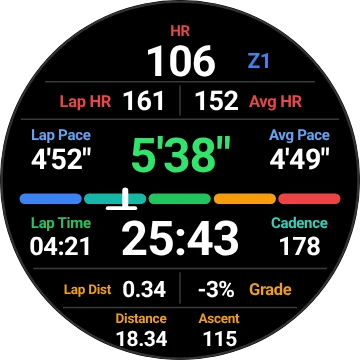
Runs: pace and power against your targets, HR zones, cadence, grade and ascent on one screen.
 WalkDeck
Unlock ·
For Amazfit walks and hikes · Zepp OS
WalkDeck adds a dense data page to your Amazfit walk or hike: heart-rate zones, lap against average pace, steps and cadence, grade, altitude and ascent — on one screen you design yourself.
One-time purchase. No subscription, no account.
The screen
Big numbers where your eyes land, the rest around them, and colour that tells you how the walk is going before you read a digit.
01 · The watch's own
Each number is drawn by the watch itself — the same values the workout records — so it matches your activity file and keeps updating with the screen off.
02 · Pace that fits
Paces past ten minutes a km or mile get their two digits, so a steep climb never overflows its spot.
03 · Targets
Set a pace or heart-rate range. The live value turns green inside it, blue below, red above, and a heart-rate range is marked on the zone bar.
04 · Your layout
Any of 62 fields in any spot, one to three columns per row, names as text, short text or icons, or numbers only.
05 · The look
Black is kindest to an AMOLED battery. Frosted glass rows or a white background if you'd rather — the always-on display stays black.
06 · On your wrist
Open WalkDeck in the app list, tap a spot on the preview and pick its field. Or do it all in the Zepp app.
Try it
This is the layout engine from WalkDeck's settings, working right here. Tap a number to change it, set the rows and the look — then copy it into the Zepp app.
The configurator needs JavaScript: turn it on to build your screen here.
Screens
The real screens from WalkDeck's simulator. Drag through them, tap one to look closer.
In the Zepp app
The WalkDeck settings in the Zepp app: a live preview of the screen, presets, targets and zones, light or dark.


Details
Heart rate, pace and speed, steps, cadence, laps, altitude, grade, ascent, training effect and more.
Straight from your watch, so WalkDeck agrees with the rest of your Amazfit data. Or max HR, threshold HR, custom.
Altitude, vertical speed, ascent and descent, grade now and per lap.
Switch a row off and the others grow into its space.
Colour first, digits second: the target, the zone and the lap tell you how it's going before you read.
Lap time, pace, HR and distance follow the watch's own laps and auto-lap.
Only what colours the screen is read, and nothing redraws that hasn't changed.
Still a native Amazfit workout: GPS, recording, sync and navigation as usual.
62 fields to choose from
Price
Free trial
Every feature, on five walks of five minutes or more. Opening the screen or a short stroll doesn't count.
Unlock
Year-end sale −26 % · until 31 DecKeep the full screen for good. After the trial WalkDeck still shows heart rate, pace and time, so a walk is never left without data.
Or save with the Sport Bundle (€15) or the Ultimate Bundle (€20), a key for each app in it.
The Deck apps
The same one-screen idea for your other workouts and your watch's battery. Buy the one you need, or save with a bundle.
Runs: pace and power against your targets, HR zones, cadence, grade and ascent on one screen.

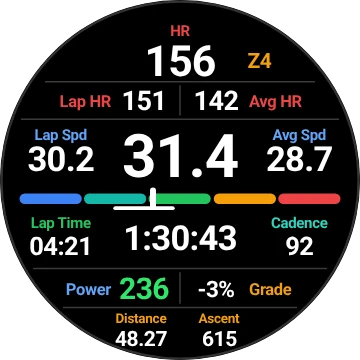
Rides: speed, power and cadence from your sensors, HR and power zones, grade and ascent on one screen.
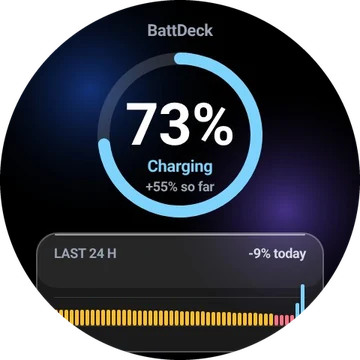
Your watch's battery: level history, drain per hour and per day, charges and what used it.
Sport Bundle
Year-end sale −26 % · until 31 Dec
RunDeck, WalkDeck and BikeDeck: a license key for each, in one purchase. €3 less than one by one.
Ultimate Bundle
Year-end sale −26 % · until 31 DecRunDeck, WalkDeck, BikeDeck and BattDeck: a license key for each, in one purchase. €4 less than one by one.
Questions
Round Amazfit watches on Zepp OS with API level 3.6 or newer:
Balance: Balance 3, Balance 3 Ti, Balance Ultra, Balance 2, Balance 2 XT, Balance
Cheetah: Cheetah 2 Ultra, Cheetah 2 Pro, Cheetah Pro, Cheetah (round)
T-Rex: T-Rex 3, T-Rex 3 Pro, T-Rex Ultra 2, T-Rex Ultra, T-Rex Dual Solar
Active: Active 3 Premium, Active 2 (round), Active Max, Active Edge
Falcon
Square ones (Bip, GTS, and the square Active and Active 2) aren't supported. It's developed and tested on the Cheetah 2 Ultra.
Walking, Indoor Walking, Outdoor Hiking, Mountaineering, Race Walking, Walking Machine and Snowshoe Hiking.
No. You walk with the normal Amazfit workout; WalkDeck is one of its data pages. Recording, GPS, laps, sync to Zepp and Strava all stay native.
By default from the zones set on your watch (Zepp OS 4.2 and newer). Older watches estimate them from your age in the Zepp profile. You can also set max HR, threshold HR or your own zones.
The screen keeps heart rate, your main pace and time, and a note to unlock. Everything comes back as soon as you enter a key — even mid-walk.
Your workout data never leaves the watch. The only thing sent online is your license key, to Polar, when you activate it.
Five walks free. Then €6, once — or all the Deck apps in a bundle.